Account Setup & Testnet Guide
Account Setup & Testnet Guide
Section titled “Account Setup & Testnet Guide”Learn how to connect your exchange/broker accounts and use testnet environments to test your strategies safely without risking real funds.
What is Testnet?
Section titled “What is Testnet?”Testnet (also called Sandbox for some platforms) is a testing environment that simulates real trading without using actual money. It’s perfect for:
- ✅ Testing new strategies risk-free
- ✅ Learning how components work
- ✅ Debugging your flows
- ✅ Practicing order execution
- ✅ Verifying configurations
Important: Testnet uses fake funds and simulated markets. Nothing is real!
Supported Testnet Platforms
Section titled “Supported Testnet Platforms”Binance Testnet
Section titled “Binance Testnet”- Testnet URL:
https://testnet.binance.vision - Available for: Cryptocurrency trading
- Features: Full trading simulation with fake USDT
Coinbase Sandbox
Section titled “Coinbase Sandbox”- Sandbox URL:
https://api-public.sandbox.exchange.coinbase.com - Available for: Cryptocurrency trading
- Features: Testing environment for Coinbase Pro
Note: Other exchanges/brokers (Kraken, KuCoin, stock brokers) don’t have testnet options yet.
Step 1: Get Testnet API Keys
Section titled “Step 1: Get Testnet API Keys”For Binance Testnet
Section titled “For Binance Testnet”-
Visit Binance Testnet
- Go to: https://testnet.binance.vision
- This is separate from your main Binance account
-
Create Testnet Account
- Click “Sign Up” or use GitHub authentication
- Important: This is NOT your real Binance account!
-
Generate API Keys
- Log in to testnet dashboard
- Navigate to “API Keys” section
- Click “Create New Key”
- Name: “GrailHub Testing” (or any name you prefer)
- Save Both Keys: API Key and Secret Key
-
Get Free Testnet Funds
- Look for “Get Test Funds” button
- Receive fake USDT to test with
- You can request more whenever needed
For Coinbase Sandbox
Section titled “For Coinbase Sandbox”-
Visit Coinbase Sandbox
- Go to: https://public.sandbox.exchange.coinbase.com
- Create a sandbox account (separate from production)
-
Generate Sandbox API Keys
- Navigate to API settings
- Create new API credentials
- Enable trading permissions
- Save: API Key, Secret, and Passphrase
-
Deposit Test Funds
- Sandbox accounts come with test funds
- Request additional funds if needed
Step 2: Add Account to GrailHub
Section titled “Step 2: Add Account to GrailHub”Desktop App
Section titled “Desktop App”-
Open GrailHub Desktop
- Launch the application
- Open your project
-
Navigate to Accounts
- Click “Accounts” in sidebar
- Or go to Project → Accounts
-
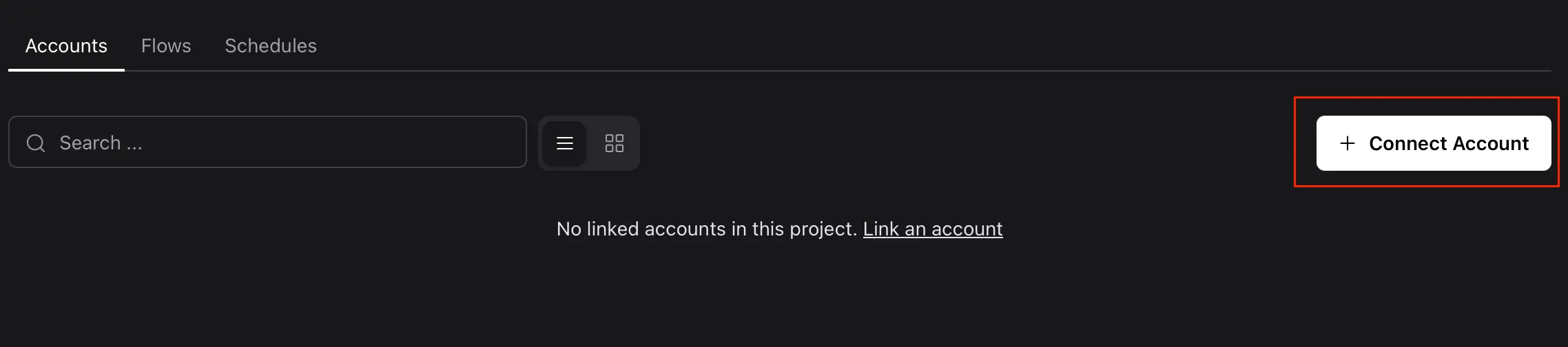
Click “Connect Account”
- Opens the account connection dialog
-
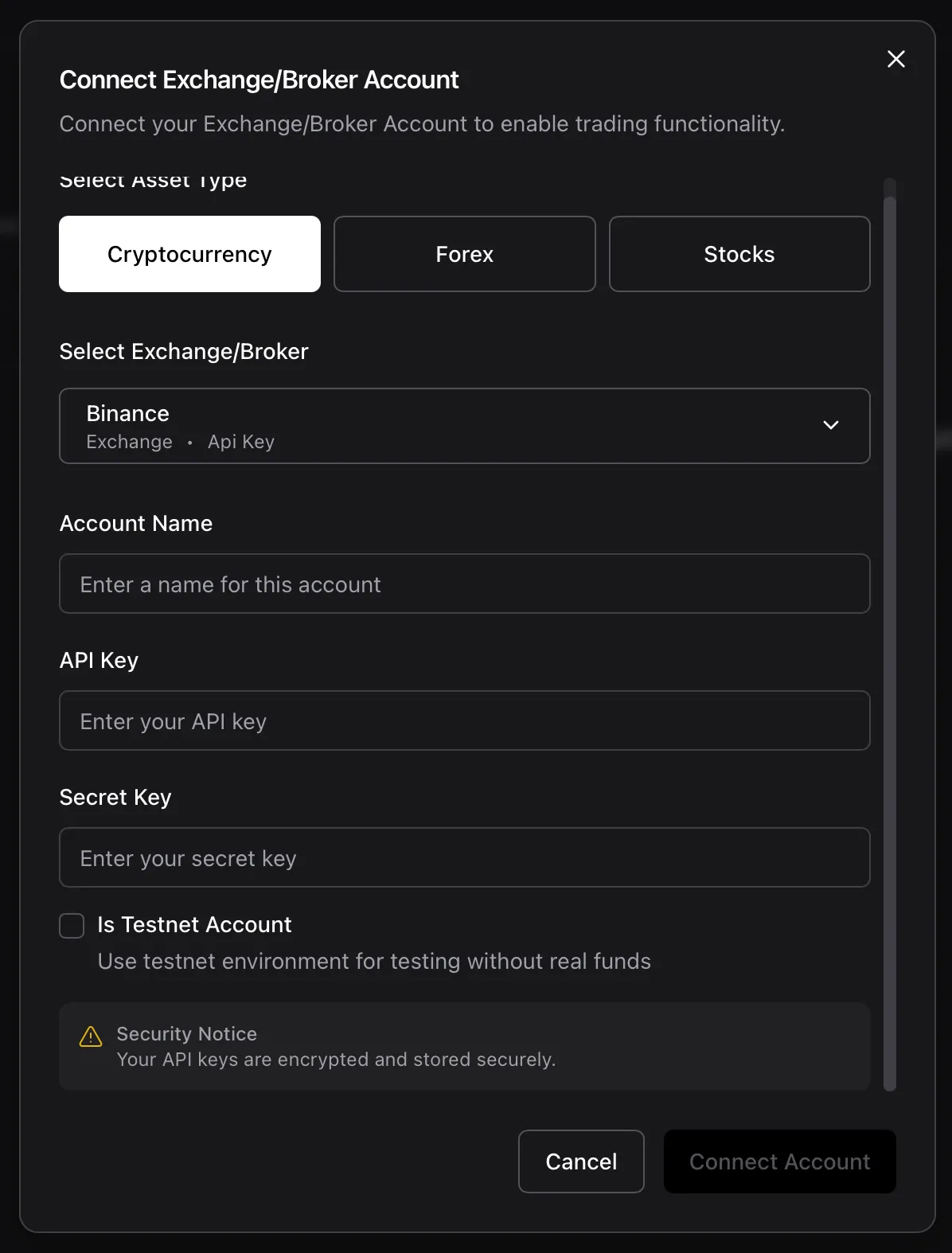
Select Asset Type
- Cryptocurrency - for Binance/Coinbase
- Forex - for OANDA/FXCM (coming soon)
- Stocks - for brokers (coming soon)
-
Choose Exchange/Broker
- Select Binance or Coinbase
-
Fill in Account Details
- Account Name: Give it a descriptive name
- Example: “Binance Testnet - Strategy Testing”
- API Key: Paste your testnet API key
- Secret Key: Paste your testnet secret key
- Account Name: Give it a descriptive name
-
Enable Testnet Mode
- ✅ Check the “Is Testnet Account” checkbox
- Critical: Don’t forget this step!
- Connect Account
- Click “Connect Account”
- GrailHub validates your credentials
- Success! Your testnet account is ready
Step 3: Use Testnet Account in Flows
Section titled “Step 3: Use Testnet Account in Flows”Enable Testnet Mode in Flow
Section titled “Enable Testnet Mode in Flow”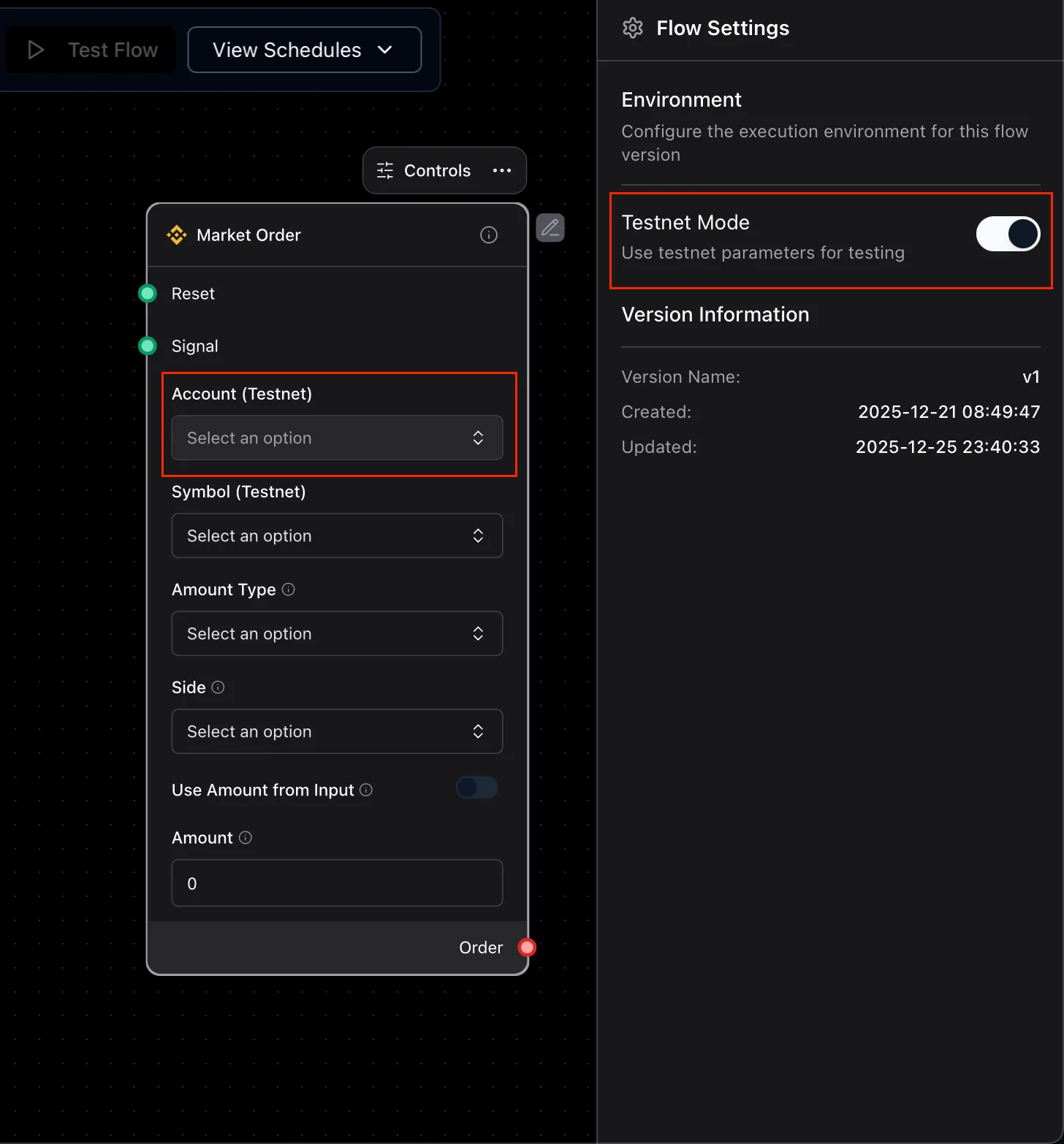
- Open Your Flow
- Navigate to Settings: Toggle “Testnet Mode” switch
- Select Account: For some components which belongs to some provider support testnet mode like Binance, Coinbase, .. then the Account config will be changed based on the selected mode
Verify Testnet Mode
Section titled “Verify Testnet Mode”Visual Indicators:
- Account name shows “(Testnet)” badge
- Flow settings display testnet warning
- Order components show testnet indicator
Safety Checks:
- All orders go to testnet endpoints
- No real money is used
- No real trades are executed
Common Issues & Solutions
Section titled “Common Issues & Solutions””API Key Invalid” Error
Section titled “”API Key Invalid” Error”Problem: Keys don’t work in GrailHub
Solutions:
- Verify testnet keys: Make sure you’re using testnet API keys, not production keys
- Check permissions: Ensure API keys have trading permissions enabled
- Regenerate keys: Create new keys if old ones don’t work
- Testnet checkbox: Verify you checked “Is Testnet Account"
"Insufficient Balance” Error
Section titled “"Insufficient Balance” Error”Problem: Can’t place orders due to low balance
Solutions:
- Request testnet funds: Go to testnet website and request more fake funds
- Check symbol: Ensure you’re trading available testnet symbols
- Reduce quantity: Use smaller order sizes for testing
”Symbol Not Found” Error
Section titled “”Symbol Not Found” Error”Problem: Trying to trade unavailable symbol
Solutions:
- Check testnet availability: Not all symbols available on testnet
- Use common pairs: Stick to BTC/USDT, ETH/USDT for testing
- Verify symbol format: Use correct format (e.g., “BTCUSDT” for Binance)
Orders Not Executing
Section titled “Orders Not Executing”Problem: Orders placed but not filling
Solutions:
- Market conditions: Testnet may have low liquidity
- Use market orders: Limit orders may not fill quickly
- Check order status: Monitor logs for order updates
- Verify connection: Ensure account is connected properly
Switching to Production
Section titled “Switching to Production”Before Going Live
Section titled “Before Going Live”Critical Pre-Launch Checklist:
-
✅ Test thoroughly on testnet
- Run strategy for at least several days
- Verify all scenarios work correctly
- Check error handling
-
✅ Review all parameters
- Order quantities appropriate for real trading
- Risk management settings configured
- Stop-loss and take-profit set
-
✅ Get production API keys
- Create API keys on production exchange
- Enable only necessary permissions
- Use IP whitelist if available
-
✅ Create production account in GrailHub
- Add new account with production keys
- DO NOT check “Is Testnet Account”
- Give it clear name: “Binance Production”
-
✅ Start with small amounts
- Use minimal quantities first
- Monitor closely for first few trades
- Gradually increase as confidence builds
Production Account Setup
Section titled “Production Account Setup”-
Get Production API Keys
- Log in to your real exchange account
- Navigate to API Management
- Create new API key with trading permissions
- Save keys securely - these control real funds!
-
Add to GrailHub
- Follow same steps as testnet
- UNCHECK “Is Testnet Account”
- Double-check you’re using production keys
-
Assign to Flow
- Select production account in flow settings
- Verify account name shows no “(Testnet)” badge
- Triple-check before running!
-
Monitor Closely
- Watch first trades carefully
- Check order execution
- Verify balance changes
- Monitor logs for errors
Security Best Practices
Section titled “Security Best Practices”API Key Security
Section titled “API Key Security”DO:
- ✅ Use unique API keys for GrailHub
- ✅ Restrict API key permissions (trading only, no withdrawal)
- ✅ Enable IP whitelist if possible
- ✅ Rotate keys regularly
- ✅ Keep secret keys private
DON’T:
- ❌ Share your API keys with anyone
- ❌ Enable withdrawal permissions
- ❌ Use same keys across multiple apps
- ❌ Store keys in plain text files
- ❌ Commit keys to version control
Account Management
Section titled “Account Management”- Separate Keys: Different keys for testnet and production
- Label Clearly: Always name accounts descriptively
- Regular Audits: Check active API keys periodically
- Revoke Unused: Delete old/unused API keys
- Monitor Activity: Check API key usage logs on exchange
Q: Can I use real API keys with testnet mode?
A: No! Always use testnet-specific API keys from the testnet website. Real API keys won’t work on testnet endpoints.
Q: Will testnet trades affect my real balance?
A: Absolutely not! Testnet is completely separate. Nothing on testnet touches your real funds.
Q: How do I get more testnet funds?
A: Visit the testnet website and look for “Get Test Funds” or similar button. You can request more anytime.
Q: Why can’t I find some symbols on testnet?
A: Testnet has limited symbols available. Stick to major pairs like BTC/USDT, ETH/USDT for testing.
Q: Can I test with stocks on testnet?
A: Not yet. Stock brokers typically don’t offer testnet environments. Use small real amounts or paper trading features if available.
Q: How long should I test before going live?
A: At minimum, test for several days across different market conditions. The more testing, the better!
Q: What if I accidentally use production keys with testnet checkbox?
A: GrailHub will direct traffic to testnet endpoints, which will fail with production keys. No risk to your funds, but orders won’t work.
Q: Can I copy a flow from testnet to production?
A: Yes! Just change the account in flow settings. But review all parameters first!
Next Steps
Section titled “Next Steps”Need Help?
Section titled “Need Help?”If you encounter issues:
- Check the logs for error messages
- Verify your testnet account configuration
- Join our community for support
- Review component documentation
Remember: When in doubt, use testnet! It’s always better to test thoroughly before risking real funds.