Template Messages Guide
This guide explains how to use template syntax to create dynamic, well-formatted notification messages in Telegram and Discord components.
What are Template Messages?
Section titled “What are Template Messages?”Template messages allow you to create dynamic content by inserting data from your flow into notification messages. Instead of sending static text, you can include real-time data like prices, order details, or any other information flowing through your system.
Basic Template Syntax
Section titled “Basic Template Syntax”Templates use Go’s template syntax with double curly braces {{ }}.
Accessing Data Fields
Section titled “Accessing Data Fields”Use .fieldName to access data fields:
Symbol: {{ .symbol }}
Price: ${{ .price }}
Example Output:
Symbol: BTCUSDT
Price: $45678.90
Simple Example
Section titled “Simple Example”If your data contains:
{
  "symbol": "ETHUSD",
  "price": 2345.67,
  "volume": 1234567
}
Template:
📊 {{ .symbol }} Update
💰 Price: ${{ .price }}
📈 Volume: {{ .volume }}
Output:
📊 ETHUSD Update
💰 Price: $2345.67
📈 Volume: 1234567
Formatting Functions
Section titled “Formatting Functions”GrailHub provides built-in formatting functions to make your messages more readable.
formatNumber
Section titled “formatNumber”Adds thousand separators to numbers.
Syntax: {{ formatNumber .fieldName }}
Examples:
Volume: {{ formatNumber .volume }}| Input | Output |
|---|---|
1234567 | 1,234,567 |
1234.56 | 1,234.56 |
999 | 999 |
formatPrice
Section titled “formatPrice”Formats prices with appropriate decimal places based on value.
Syntax: {{ formatPrice .price }}
Formatting Rules:
- Prices ≥ $1: 2 decimal places
- Prices ≥ $0.01: 4 decimal places
- Prices < $0.01: 8 decimal places
Examples:
Price: ${{ formatPrice .price }}| Input | Output |
|---|---|
45678.9 | 45678.90 |
0.05432 | 0.0543 |
0.00001234 | 0.00001234 |
formatTime
Section titled “formatTime”Formats Unix timestamps (milliseconds) to readable time (HH:MM:SS).
Syntax: {{ formatTime .timestamp }}
Examples:
Time: {{ formatTime .timestamp }}| Input (ms) | Output |
|---|---|
1704196800000 | 14:00:00 |
1704183600000 | 10:20:00 |
formatDate
Section titled “formatDate”Formats Unix timestamps (milliseconds) to readable date and time.
Syntax: {{ formatDate .timestamp }}
Format: YYYY-MM-DD HH:MM:SS
Examples:
Executed at: {{ formatDate .timestamp }}| Input (ms) | Output |
|---|---|
1704196800000 | 2024-01-02 14:00:00 |
1704183600000 | 2024-01-02 10:20:00 |
formatString
Section titled “formatString”Converts numbers to string format without scientific notation (e+).
Syntax: {{ formatString .fieldName }}
Examples:
Order ID: {{ formatString .order_id }}
Transaction ID: {{ formatString .transaction_id }}| Input | Output |
|---|---|
12345678 | 12345678 |
1.2345678e+07 | 12345678 |
9876543210 | 9876543210 |
String Functions
Section titled “String Functions”Converts text to UPPERCASE.
Syntax: {{ upper .text }}
Examples:
Status: {{ upper .status }}
Code: {{ upper .code }}| Input | Output |
|---|---|
"active" | ACTIVE |
"pending" | PENDING |
Converts text to lowercase.
Syntax: {{ lower .text }}
Examples:
Username: {{ lower .username }}
Email: {{ lower .email }}| Input | Output |
|---|---|
"ADMIN" | admin |
"User@Example.COM" | user@example.com |
Converts text to Title Case (first letter of each word capitalized).
Syntax: {{ title .text }}
Examples:
Name: {{ title .name }}
Status: {{ title .status }}| Input | Output |
|---|---|
"john doe" | John Doe |
"order completed" | Order Completed |
Removes leading and trailing whitespace.
Syntax: {{ trim .text }}
Examples:
Message: {{ trim .message }}replace
Section titled “replace”Replaces all occurrences of a substring with another.
Syntax: {{ replace .text "old" "new" }}
Examples:
{{ replace .message "error" "warning" }}
{{ replace .path "/" "-" }}
Input: "Payment error occurred"
Output: "Payment warning occurred"
contains
Section titled “contains”Checks if a string contains a substring.
Syntax: {{ if contains .text "substring" }}
Examples:
{{ if contains .status "success" }}
  ✅ Operation successful
{{ end }}

{{ if contains .email "@gmail.com" }}
  Gmail user detected
{{ end }}
hasPrefix
Section titled “hasPrefix”Checks if a string starts with a prefix.
Syntax: {{ if hasPrefix .text "prefix" }}
Examples:
{{ if hasPrefix .code "ERR" }}
  ⚠️ Error code detected
{{ end }}

{{ if hasPrefix .id "ORD" }}
  Order ID format
{{ end }}
hasSuffix
Section titled “hasSuffix”Checks if a string ends with a suffix.
Syntax: {{ if hasSuffix .text "suffix" }}
Examples:
{{ if hasSuffix .filename ".pdf" }}
  📄 PDF document
{{ end }}

{{ if hasSuffix .email ".com" }}
  Commercial email
{{ end }}
substring
Section titled “substring”Extracts a portion of a string from start to end index.
Syntax: {{ substring .text start end }}
Examples:
Short code: {{ substring .code 0 5 }}
Preview: {{ substring .description 0 50 }}...
Input: "ABCDEFGHIJ" with substring .text 0 5
Output: "ABCDE"
Math Functions
Section titled “Math Functions”Adds two numbers.
Syntax: {{ add .value1 .value2 }}
Examples:
Total: {{ add .subtotal .tax }}
Sum: {{ add 100 50 }}
Result: 150
Subtracts the second number from the first.
Syntax: {{ sub .value1 .value2 }}
Examples:
Remaining: {{ sub .total .used }}
Difference: {{ sub 100 30 }}
Result: 70
Multiplies two numbers.
Syntax: {{ mul .value1 .value2 }}
Examples:
Total: ${{ formatPrice (mul .price .quantity) }}
Area: {{ mul .width .height }}
Example: {{ mul 25 4 }} = 100
Divides the first number by the second.
Syntax: {{ div .value1 .value2 }}
Examples:
Average: {{ div .total .count }}
Per unit: ${{ formatPrice (div .total .quantity) }}
Example: {{ div 100 4 }} = 25
Returns the remainder of division.
Syntax: {{ mod .value1 .value2 }}
Examples:
{{ if eq (mod .count 2) 0 }}Even{{ else }}Odd{{ end }}
Remainder: {{ mod 17 5 }}
Example: {{ mod 17 5 }} = 2
Rounds a number to the nearest integer.
Syntax: {{ round .value }}
Examples:
Rounded: {{ round .average }}
Count: {{ formatNumber (round .estimate) }}| Input | Output |
|---|---|
45.7 | 46 |
45.2 | 45 |
45.5 | 46 |
Rounds down to the nearest integer.
Syntax: {{ floor .value }}
Examples:
Minimum: {{ floor .value }}| Input | Output |
|---|---|
45.9 | 45 |
45.1 | 45 |
Rounds up to the nearest integer.
Syntax: {{ ceil .value }}
Examples:
Maximum: {{ ceil .value }}
Pages needed: {{ ceil (div .items 10) }}| Input | Output |
|---|---|
45.1 | 46 |
45.9 | 46 |
Returns the absolute value (removes negative sign).
Syntax: {{ abs .value }}
Examples:
Difference: {{ abs .change }}
Distance: {{ abs (sub .value1 .value2) }}| Input | Output |
|---|---|
-50 | 50 |
50 | 50 |
Returns the smaller of two numbers.
Syntax: {{ min .value1 .value2 }}
Examples:
Minimum: {{ min .limit .available }}
Lower bound: {{ min .price .budget }}
Example: {{ min 100 75 }} = 75
Returns the larger of two numbers.
Syntax: {{ max .value1 .value2 }}
Examples:
Maximum: {{ max .required .available }}
Upper bound: {{ max .price .minimum }}
Example: {{ max 100 75 }} = 100
Utility Functions
Section titled “Utility Functions”default
Section titled “default”Provides a default value if the field is empty or zero.
Syntax: {{ default "defaultValue" .field }}
Examples:
Status: {{ default "Unknown" .status }}
Name: {{ default "Guest" .username }}
Count: {{ default 0 .count }}
Use case: Prevents empty fields from showing blank spaces.
Returns the length of a string or collection.
Syntax: {{ len .text }}
Examples:
Characters: {{ len .message }}
{{ if gt (len .password) 8 }}Strong password{{ end }}
Example: {{ len "Hello" }} = 5
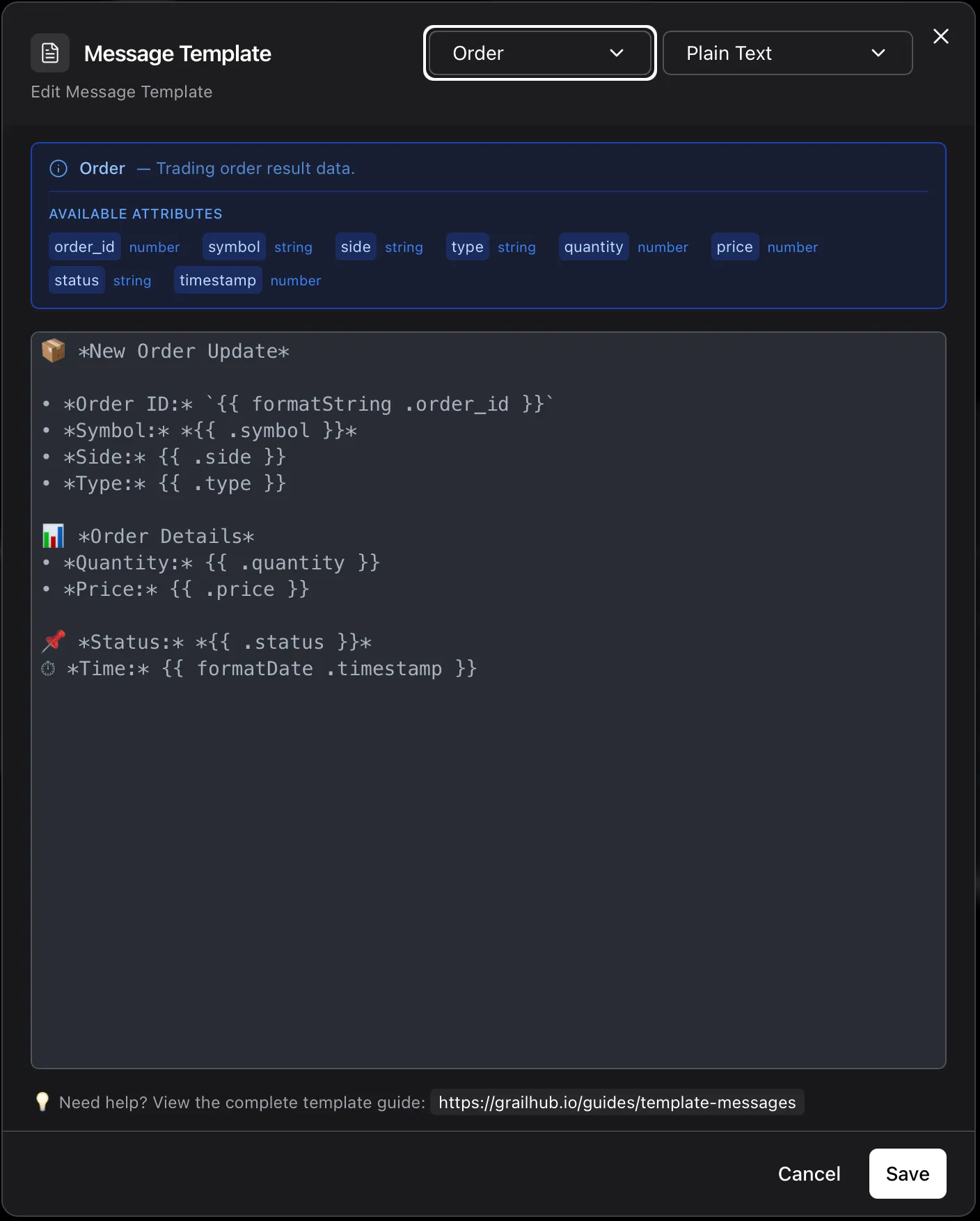
Working with Order Data
Section titled “Working with Order Data”When working with trading orders, use formatting functions for better readability.
Order Template Example
Section titled “Order Template Example”📦 *New Order Update*
• *Order ID:* {{ .order_id }}
• *Symbol:* *{{ .symbol }}*
• *Side:* {{ .side }}
• *Type:* {{ .type }}
📊 *Order Details*
• *Quantity:* {{ formatNumber .quantity }}
• *Price:* ${{ formatPrice .price }}
📌 *Status:* *{{ .status }}*
⏱ *Time:* {{ formatDate .timestamp }}Sample Output:
📦 *New Order Update*

• *Order ID:* 12345678
• *Symbol:* *BTCUSDT*
• *Side:* BUY
• *Type:* LIMIT

📊 *Order Details*
• *Quantity:* 1,500
• *Price:* $45,678.50

📌 *Status:* *FILLED*
⏱ *Time:* 2024-01-02 14:30:45
Conditional Logic
Section titled “Conditional Logic”Use if statements to show content conditionally.
Basic If Statement
Section titled “Basic If Statement”{{ if .condition }}
This shows when condition is true
{{ end }}If-Else Statement
Section titled “If-Else Statement”{{ if gt .price 100 }}
Price is high: ${{ .price }}
{{ else }}
Price is low: ${{ .price }}
{{ end }}Comparison Operators
Section titled “Comparison Operators”| Operator | Description | Example |
|---|---|---|
eq | Equal | {{ if eq .status "FILLED" }} |
ne | Not equal | {{ if ne .status "CANCELED" }} |
lt | Less than | {{ if lt .price 100 }} |
le | Less than or equal | {{ if le .price 100 }} |
gt | Greater than | {{ if gt .price 100 }} |
ge | Greater than or equal | {{ if ge .price 100 }} |
Example: Price Alert
Section titled “Example: Price Alert”🚨 *Price Alert*
{{ .symbol }} is now ${{ formatPrice .price }}
{{ if gt .price 50000 }}
⚠️ Price is above $50,000!
{{ else if gt .price 40000 }}
📊 Price is between $40,000 and $50,000
{{ else }}
ℹ️ Price is below $40,000
{{ end }}Working with Different Data Types
Section titled “Working with Different Data Types”Ticker Data
Section titled “Ticker Data”📈 *{{ .symbol }} Update*
💰 Price: ${{ formatPrice .price }}
📊 Volume: {{ formatNumber .volume }}
🕐 {{ formatTime .timestamp }}Aggregate Bar (OHLCV)
Section titled “Aggregate Bar (OHLCV)”📊 *{{ .ticker }} Candle*
🟢 Open: ${{ formatPrice .open }}
🔴 Close: ${{ formatPrice .close }}
⬆️ High: ${{ formatPrice .high }}
⬇️ Low: ${{ formatPrice .low }}
📦 Volume: {{ formatNumber .volume }}Order Book
Section titled “Order Book”📖 *Order Book: {{ .symbol }}*
🟢 Best Bid: ${{ formatPrice .bids.0.price }}
🔴 Best Ask: ${{ formatPrice .asks.0.price }}
📊 Spread: ${{ formatPrice .spread }}Advanced Examples
Section titled “Advanced Examples”Multi-Line Conditional
Section titled “Multi-Line Conditional”{{ if eq .side "BUY" }}
🟢 *BUY ORDER*
{{ else }}
🔴 *SELL ORDER*
{{ end }}
Symbol: {{ .symbol }}
Quantity: {{ formatNumber .quantity }}
Price: ${{ formatPrice .price }}
Total: ${{ formatPrice .total }}Status-Based Messages
Section titled “Status-Based Messages”{{ if eq .status "FILLED" }}
✅ Order Filled Successfully
{{ else if eq .status "PARTIALLY_FILLED" }}
⏳ Order Partially Filled
{{ else if eq .status "CANCELED" }}
❌ Order Canceled
{{ else if eq .status "REJECTED" }}
🚫 Order Rejected
{{ else }}
📝 Order {{ .status }}
{{ end }}
Order #{{ .order_id }}
{{ formatDate .timestamp }}Combining Multiple Functions
Section titled “Combining Multiple Functions”📊 *Trading Summary*
Symbol: {{ .symbol }}
Entry: ${{ formatPrice .entry_price }}
Current: ${{ formatPrice .current_price }}
Quantity: {{ formatNumber .quantity }}
{{ if gt .current_price .entry_price }}
📈 Profit: ${{ formatPrice .profit }}
{{ else }}
📉 Loss: ${{ formatPrice .loss }}
{{ end }}
Updated: {{ formatDate .timestamp }}Best Practices
Section titled “Best Practices”1. Use Formatting Functions
Section titled “1. Use Formatting Functions”❌ Don’t:
Price: {{ .price }}
Volume: {{ .volume }}
Time: {{ .timestamp }}
✅ Do:
Price: ${{ formatPrice .price }}
Volume: {{ formatNumber .volume }}
Time: {{ formatDate .timestamp }}
2. Add Context with Emojis
Section titled “2. Add Context with Emojis”📊 Market Update
💰 Price: ${{ formatPrice .price }}
📈 Change: {{ .change }}%
🕐 {{ formatTime .timestamp }}3. Use Clear Labels
Section titled “3. Use Clear Labels”Symbol: {{ .symbol }}
Side: {{ .side }}
Status: {{ .status }}4. Format for Readability
Section titled “4. Format for Readability”Use line breaks and spacing:
📦 *Order Confirmation*

Order ID: {{ .order_id }}
Symbol: {{ .symbol }}

Details:
• Quantity: {{ formatNumber .quantity }}
• Price: ${{ formatPrice .price }}
• Total: ${{ formatPrice .total }}

Status: {{ .status }}
Time: {{ formatDate .timestamp }}
Parse Modes (Telegram)
Section titled “Parse Modes (Telegram)”Telegram supports different formatting modes:
Plain Text (Default)
Section titled “Plain Text (Default)”No special formatting. Use for simple messages.
Markdown
Section titled “Markdown”*Bold Text*
_Italic Text_
`Code Text`
[Link](https://example.com)<b>Bold Text</b>
<i>Italic Text</i>
<code>Code Text</code>
<a href="https://example.com">Link</a>Example with Markdown:
*📊 {{ .symbol }} Alert*

Price: *${{ formatPrice .price }}*
Volume: `{{ formatNumber .volume }}`

_Updated {{ formatTime .timestamp }}_
Common Patterns
Section titled “Common Patterns”Price Alert
Section titled “Price Alert”🚨 *Price Alert*
{{ .symbol }} has {{ if gt .change 0 }}risen{{ else }}fallen{{ end }} by {{ .change }}%
Current Price: ${{ formatPrice .price }}
24h Volume: {{ formatNumber .volume }}
{{ formatDate .timestamp }}Order Notification
Section titled “Order Notification”📦 *Order {{ .status }}*
#{{ .order_id }}
{{ .symbol }} - {{ .side }} {{ .type }}
Quantity: {{ formatNumber .quantity }}
{{ if ne .price 0 }}Price: ${{ formatPrice .price }}{{ end }}
{{ formatDate .timestamp }}Trade Execution
Section titled “Trade Execution”✅ *Trade Executed*
{{ .symbol }}
{{ .side }} {{ formatNumber .quantity }} @ ${{ formatPrice .price }}
Total: ${{ formatPrice .total }}
Fee: ${{ formatPrice .fee }}
{{ formatDate .timestamp }}Troubleshooting
Section titled “Troubleshooting”Field Not Showing
Section titled “Field Not Showing”Problem: {{ .fieldname }} shows nothing
Solution: Check field name spelling and case sensitivity. Use the exact field name from your data.
Number Format Issues
Section titled “Number Format Issues”Problem: Numbers show too many decimals
Solution: Use formatPrice for prices or formatNumber for quantities.
Timestamp Shows as Number
Section titled “Timestamp Shows as Number”Problem: {{ .timestamp }} shows 1704196800000
Solution: Use formatDate or formatTime to convert timestamps.
Conditional Not Working
Section titled “Conditional Not Working”Problem: if statement doesn’t work as expected
Solution: Check operator syntax. Use gt, lt, eq instead of >, <, ==.
Testing Your Templates
Section titled “Testing Your Templates”- Start Simple: Begin with basic field access
- Add Formatting: Apply formatting functions one at a time
- Test Conditions: Verify conditional logic with different data
- Check Output: Send test messages to verify formatting
Next Steps
Section titled “Next Steps”- Telegram Bot Setup
- Discord Webhook Setup
- Telegram Notification Component
- Discord Notification Component
Reference
Section titled “Reference”For more advanced template features, see the Go template documentation.